General Architecture
The BeeGFS architecture is composed of four main services:
- Management service
- A registry and watchdog for all other services
- Storage service
- Stores the distributed user file contents
- Metadata service
- Stores access permissions and striping information
- Client service
- Mounts the file system to access the stored data
In addition to the main services list above, BeeGFS also comes with an optional graphical administration and monitoring service (the so-called “admon”).
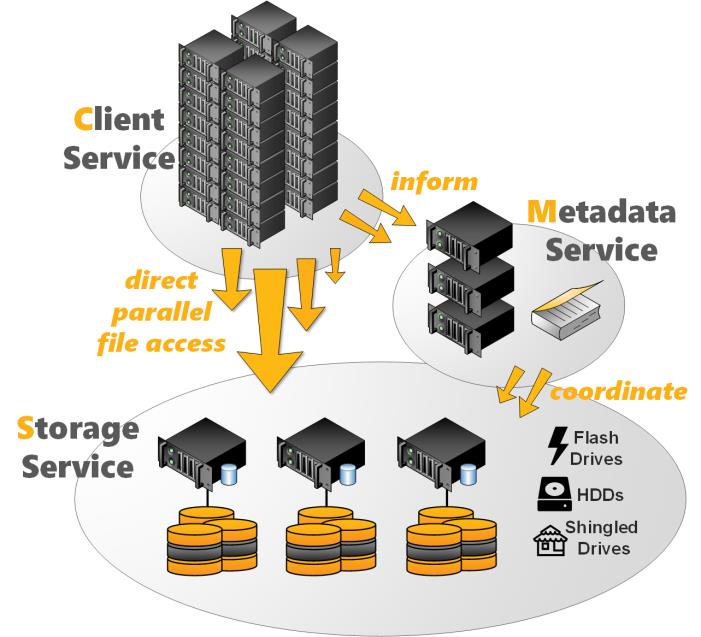
BeeGFS Architecture Overview
All BeeGFS services write a log file with the corresponding service name to /var/log/beegfs-*.log
For high flexibility, it is possible to run multiple instances with any BeeGFS service on the same machine. These instances can be part of the same BeeGFS file system instance or as well of different file system instances. One typical example is the client service, that can mount two different BeeGFS file systems (e.g. an old one and a new one) on the same compute node.
High flexibility and easy administration is also given since the BeeGFS management, meta, and storage services do not access the disks directly. Instead, they store data inside any local Linux POSIX file system, such as ext4, xfs or zfs. This provides the flexibility to choose the underlying file system which works best for the given service, use case or hardware and makes it also easy to explore how BeeGFS stores files.
The underlying file system in which the BeeGFS services store their data are called management, metadata, or storage targets. These correspond to the name of the BeeGFS service, that uses the target to store its data. While the BeeGFS management and metadata service each use a single target per service instance, the storage service supports one or multiple storage targets for a single storage service instance.
This software-based approach without any strict requirements for the hardware provides the possibility to choose from a very wide range of hardware components. In the following chapters, we will discuss the BeeGFS services and flexibility in more detail.
The Management Service
Management Service
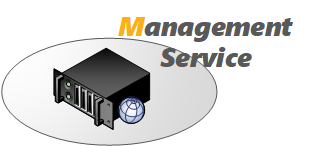
The management service can be figured as a “meeting point” for the BeeGFS metadata, storage, and client services. It is very light-weight and typically not running on a dedicated machine, as it is not critical for performance and stores no user data. It is watching all registered services and checks their state. Therefore, it is the first service, which needs to be setup in a newly deployed environment.
The management service maintains a list of all other BeeGFS services and their state.
The Metadata Service
Metadata Service
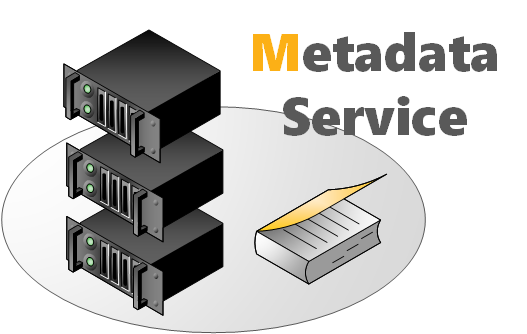
The metadata service stores information about the data e.g. directory information, file and directory ownership and the location of user file contents on storage targets. It provides information about the location (the so-called “stripe pattern”) for an individual user file to a client when the client opens the file, but afterwards the metadata service is not involved in data access (i.e. for file read and write operations) until the file is closed.
The BeeGFS metadata service is a scale-out service, meaning there can be one or many metadata services in a BeeGFS file system. Each metadata service is responsible for its exclusive fraction of the global namespace, so that having more metadata servers improves the overall system performance. Adding more metadata servers later is always possible.
Each metadata service instance has exactly one metadata target to store its data. On the metadata target, BeeGFS creates one metadata file per user-created file. This is an important design decision of BeeGFS to avoid the case of storing all metadata inside a single database that could possibly get corrupted.
Usually, a metadata target is an ext4 file system based on a RAID1 or RAID10 of flash drives, as low metadata access latency improves the responsiveness of the file system. BeeGFS metadata is very small and grows linear with the number of user-created files. 512GB of usable metadata capacity are typically good for about 150 million user files.
As low metadata access latency is a major benefit for performance of the overall system, faster CPU cores will improve latency.
The Storage Service

Storage Service
The storage service (sometimes also referred to as the “object storage service”) is the main service to store striped user file contents, also known as data chunk files.
Similar to the metadata service, the BeeGFS storage service is based on a scale- out design. That means, you can have one or multiple storage services per BeeGFS file system instance, so that each storage service adds more capacity and especially also more performance to the file system.
A storage service instance has one or multiple storage targets. While such a storage target can generally be any directory on a local filesystem, a storage target typically is a hardware RAID-6 (typically composed of 8+2 or 10+2) or zfs RAIDz2 volume, of either internal or externally attached drives.
The storage service works with any local Linux POSIX file system. Usually, the storage targets are based on xfs in the case of hardware RAID controllers.
In contrast to the metadata service, many people try to optimize the traffic on the storage targets for large sequential access to have optimal performance on spinning disks. However, as BeeGFS uses all the available RAM on the storage servers (which is not otherwise allocated by processes) automatically for caching, it can also aggregate small IOs requests into larger blocks before writing the data out to disk. Furthermore it is able to serve data from the cache if it has already been recently requested by another client.
The capability to quickly write bursts of data into the server RAM cache or to quickly read data from it is also the reason why it makes sense to have a network that is significantly faster than the disk streaming throughput of the servers.
To distribute the used space and to aggregate the performance of multiple servers even for a single large file, BeeGFS uses striping, which means the file gets split up into chunks of fixed size and those chunks are distributed across multiple storage targets.
The chunksize and number of targets per file is decided by the responsible metadata service when a file gets created. This information is called the stripe pattern. The stripe pattern can be configured per directory (e.g. by using the beegfs-ctl command line tool) or even for individual files (e.g. by using the BeeGFS Striping API).
The files on the storage targets containing the user data are called chunk files. For each user file, there is exactly one chunk file on the corresponding storage targets. To not waste space, BeeGFS only creates chunk files when the client actually writes data to the corresponding target. And also, for not wasting space, the chunk size is not statically allocated, meaning when the user writes only a single byte into the file, BeeGFS will also create only a single chunk file of 1 byte in size.
By default, BeeGFS picks the storage targets for a file randomly, as this has shown to provide best results in multi-user environments where (from the point of view of the file system) the different users are also concurrently creating a random mix of large and small files. If necessary, (e.g. to have deterministic streaming benchmark results) different target choosers are available in the metadata service configuration file.
To prevent storage targets running out of free space, BeeGFS has three different labels for free target capacity: normal, low and emergency (the latter meaning only very little space left or the target is unreachable). The target chooser running on the metadata service will prefer targets labeled as normal. As long as such targets are available, and it will not pick any target labeled as critical before all targets entered that state. With this approach, BeeGFS can also work with storage targets of different sizes. The thresholds for low and emergency can be changed in the management service configuration file.
The Client Service
BeeGFS comes with a client that registers natively with the virtual file system interface of the Linux kernel for maximum performance. This kernel module has to be compiled to match the used kernel, but don’t worry: The kernel module source code is included in the normal client package and compilation for the currently running Linux kernel happens fully automatically, so there are no manual steps required when you update your Linux kernel or when you update the BeeGFS client service. The installation or a BeeGFS client update can even be done without rebooting the machine.
The client kernel module uses an additional userspace helper daemon for DNS lookups and to write the log file.
When the client is loaded, it will mount the file systems defined in beegfs- mounts.conf instead of the usual Linux approach based on /etc/fstab (which is also possible with BeeGFS, but not recommended). This is an approach of starting the beegfs-client like any other Linux service through a service start script. It enables the automatic recompilation of the BeeGFS client module after system updates and makes handling of the BeeGFS client service generally more convenient.
The native BeeGFS client should be used on all hosts that are supposed to access BeeGFS with maximum performance. However, it is also possible to re-export a BeeGFS mountpoint through NFSv4 or through Samba or to use BeeGFS as a drop- in replacement for Hadoop’s HDFS. Upcoming releases of BeeGFS will also provide a native BeeGFS client for Windows.
Admon: Administration and Monitoring System
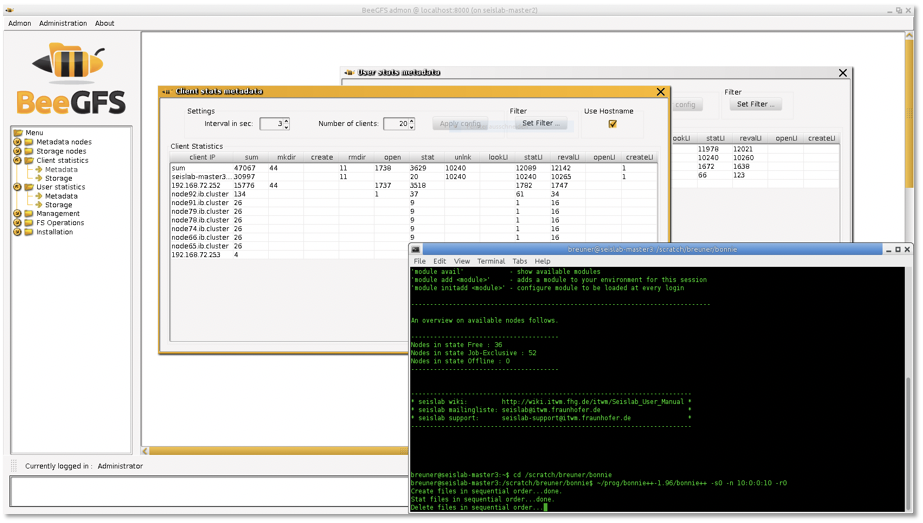
Admon GUI - Client Operation Statistics
In addition to the beegfs-ctl command line tool, the optional BeeGFS Administration and Monitoring system (short: admon) provides a graphical interface to perform basic administrative tasks and to monitor the state of the file system and its components.
The BeeGFS admon consists of two parts:
- The admon backend service, which runs on any machine with network access to the metadata and storage services. This service gathers the status information of the other BeeGFS services and stores it in a database.
- The graphical Java-based client, which runs on your workstation. It connects to the remote admon daemon via http.